🐝 Using Electron for a Desktop Pet

J.Gong
2026-05-23
1.32min
🐝 Using Electron for a Desktop Pet
I’m still working on the problem I mentioned in this post.
I finally found another approach that is comparatively more stable than the previous solution (which caused some crashes). ⚠️
🪟 Unity Window Approach (Colorkey + Popup Window)
I used a colorkey-based transparency method to make the window transparent, and launched it using the --popupwindow parameter.
To manage launching, I built a simple launcher:
class Program
{
    static void Main(string[] args)
    {
        string gamePath = Path.Combine(AppDomain.CurrentDomain.BaseDirectory, "Grandpa's Bee Haven.exe");

        string arguments = "-popupwindow -screen-fullscreen 0";

        if (args.Length > 0)
        {
            arguments += " " + string.Join(" ", args);
        }

        ProcessStartInfo startInfo = new ProcessStartInfo
        {
            FileName = gamePath,
            Arguments = arguments,
            UseShellExecute = false,
            WorkingDirectory = Path.GetDirectoryName(gamePath)
        };

        Process.Start(startInfo);
    }
}
I also changed the output type to WinExe to prevent a command-line window from appearing on startup:
<Project Sdk="Microsoft.NET.Sdk">
  <PropertyGroup>
    <OutputType>WinExe</OutputType>
    <TargetFramework>net8.0</TargetFramework>
  </PropertyGroup>
</Project>
🐧 The Linux Problem
However, there’s still no solid solution on Linux.
This led me to dig deeper into how Linux windowing systems behave:
- On X11, legacy rendering allows more flexibility with transparent windows
- On Wayland, however, security restrictions are much stricter
In Wayland, I can’t even reliably get the position of my own window 😅
To avoid spending too much time writing platform-specific desktop hacks, I started considering a change in stack.
⚡ Switching to Electron
I decided to try Electron instead.
In the era of vibecoding, building an Electron app is surprisingly easy — just describe what you want and let the AI scaffold it.
My requirements were simple:
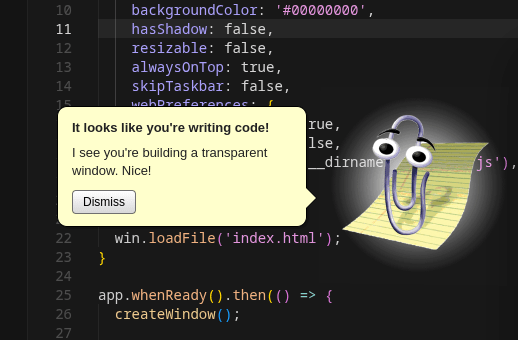
- 🪟 Create a transparent Electron window
- 🎨 Render a clippy image using canvas
I also wanted to test how Electron handles transparency and alpha blending, since many “transparent” solutions end up rendering as solid black.
🌈 Result
Electron actually handles transparency much better than the colorkey approach.
- Alpha transparency works properly
- Even gradients are preserved correctly
So visually, it’s a clear improvement.
⚠️ But There’s a Catch
Even though the canvas can be fully transparent across all platforms, a few issues remain:
- ❌ Mouse cannot click through transparent areas
- ❌ The original project (Grandpa’s Bee Haven) is tightly coupled with native APIs can not be migrated to web.
This means a full migration to Electron would require a significant rewrite, and may not actually solve the core problem.
So for now… this might not be the final solution.