🐧 Support Proton Environment

J.Gong
2026-05-25
0.72min
🐧 Support Proton Environment
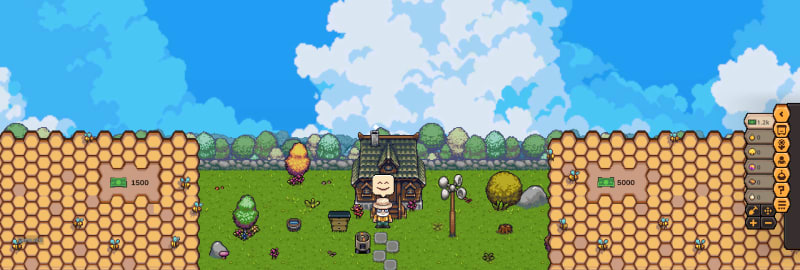
Yes, I am done implementing the transparent background support for Linux. Now, I have started adding a specific background for it.
As most game players are using Proton 10 as their compatibility layer, the code may detect the platform as Windows 🪟. However, Proton exposes a wine_get_version function to retrieve the Proton version. This function is only callable within a Proton environment.
Therefore, we can use the following script to manage the background:
[DisallowMultipleComponent]
public class LinuxBackgroundCanvas : MonoBehaviour
{
    // 🔍 Import the wine_get_version function from ntdll.dll
    [DllImport("ntdll.dll", EntryPoint = "wine_get_version", CallingConvention = CallingConvention.Cdecl)]
    private static extern IntPtr WineGetVersion();

    private void Awake()
    {
        // 🚫 Disable the canvas if the environment is neither Linux nor Proton
        if (!IsLinuxOrProton())
        {
            gameObject.SetActive(false);
        }
    }

    private static bool IsLinuxOrProton()
    {
        try
        {
            // 🛠️ Check if the Proton function returns a valid pointer
            return WineGetVersion() != IntPtr.Zero;
        }
        catch (DllNotFoundException)
        {
            return false;
        }
        catch (EntryPointNotFoundException)
        {
            return false;
        }
        catch (Exception)
        {
            return false;
        }
    }
}
🎨 For the background asset, I used the Free Sky with Clouds Background Pixel Art Set.
📸 Result
In Linux, run the following command to test the result.
STEAM_COMPAT_CLIENT_INSTALL_PATH="/home/${username}/.steam/root" STEAM_COMPAT_DATA_PATH="/home/${username}/.proton_bee" /home/${username}/.steam/root/steamapps/common/Proton\ 10.0/proton run "/home/${username}/Downloads/win32/win32/Grandpa's Bee Haven.exe"