Week 34: Optimization is a Dirty Job

J.Gong
2026-08-26
3.77min
Week 34: Optimization is a Dirty Job
Grandpa’s Bee Haven, the first game I made in Estonia, is now in public testing, click the link and request for testing now ~ We wish you can tell us what you like, what you wish to add, what you dislike.
Performance in game is a huge topic. Because the goals of different genre varies. A 3D shooting game may focus on high FPS rate while our idle game should focus on low resource usage. While to do this job will undoubtly impact on the quality of the original files. Some designers wouldn’t like you to change their designs eventhough it takes hundreds of RAMs to render. Some programmers do not like the heavy CPU consuming logic to be changed. But for the game to be delivered on the target devices. The performance and the quality should be ballanced.
Memory allocation
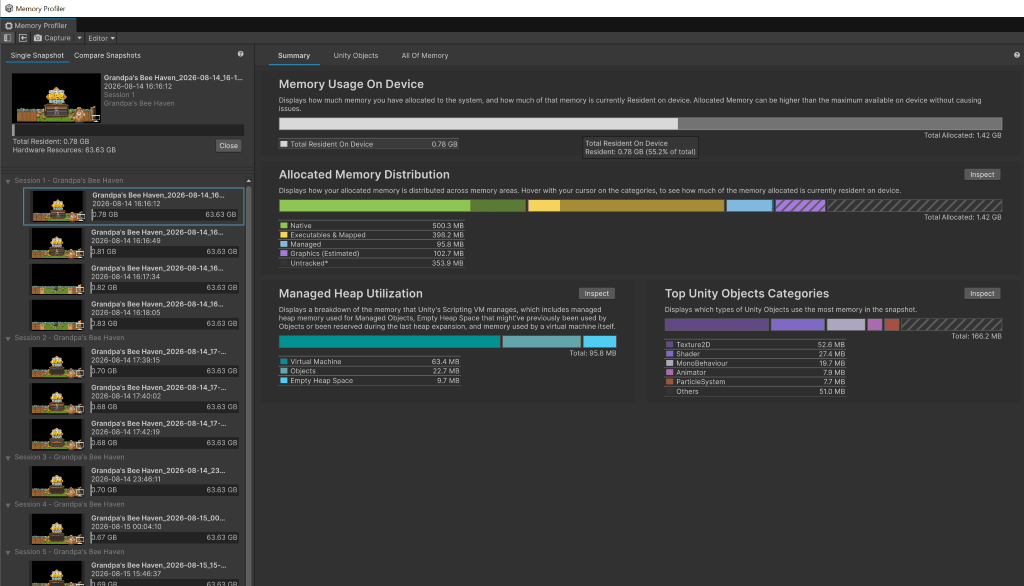
Firstly check the redundant packages, some packages only used in editor, but they were incidentally included in the package. For example, we have nuget included in the game, it used about 20MB of the virtual machine memory.
Unity’s memory profiler is a nice tool to capture the memory usage.
CJK Fonts
Earlier this year, I made a post about localization. That method may cause some memory issues. As the method is to bake all the commonly used characters into font assets and allocate as fallback of the Latin fonts. The fonts will be firstly allocated in the memory. Then in the post that talking about language selection. This will cause a spike of memory allocation as the list will include all the font assets.
So, in our project, there are three things to do:
- Bake the language names into new assets
- Bake the characters on demand, only the needed characters not the common characters
- Make the fonts addressable
I was very surprised that the CJK improvement was not very obviously, when I checked the Unity Object capture of the entry scene. The improvement was only 100KB.
However, the fonts are more clear now.
Sound
The sounds should consider two different situations.
- long background sounds
- sound effects
Most of the sounds were mp3 files, they are decompressed in memory. Some background music after decompressed can be several hundreds of MBs. Convert them into wav files, and in Unity configure them to streaming file. The sound will be played as demanded. But this will increase IO delay. So if you are making FPS(First Person Shooting) game with shooting sound effects, save them in memory is a good solution.
Sprite Atlas
In flash time, the front end developer used to put different sprites together. So these sprites can be downloaded as one.
Nowadays, it is not vital to make sprite sheet. As HTTP2’s multiplexing can solve that.
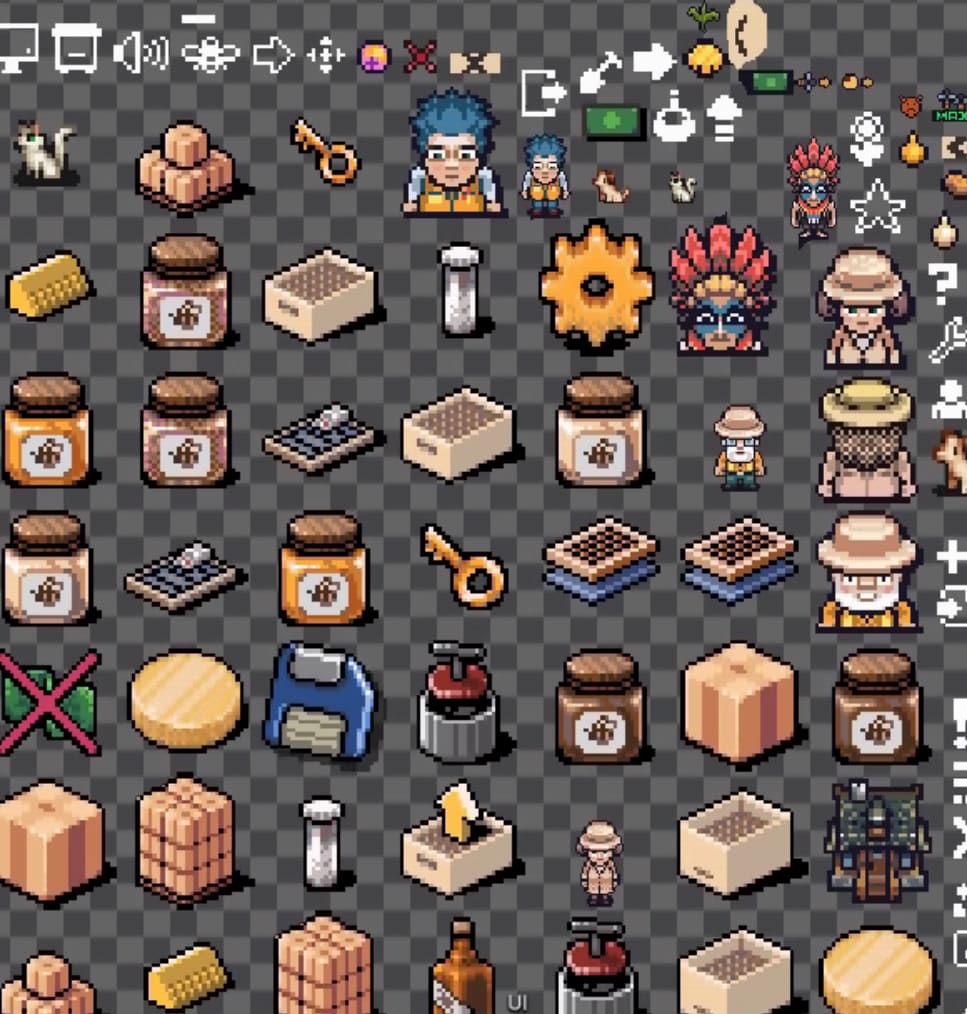
But in the hardware, there are other things to consider. As the GPU calculates everything in 2 square data. The sprites sending to GPU will be changed to 2 square data, if the datas are not enough, GPU will use 0s to fill them. 0s are not calculation consuming but they occupies memories. We have 1235 sprites. Each one uses several bytes memory, in total will be huge.
Worse, in some PC devices, the data will be transfered through two GPUs. The data will not only occupy the VRAMs in both GPUs. If the sprites removes fast, they will be crowding the I/O bus.
So unity provides sprite atlas. To automatically map the sprites into sheet.
Many sprites have set both read and write permission. This will cause double memory usage. Only read can save half of the memory. But if you need to use the sprite as cursor. It needs write permission.
This saves 5MB in the VRAM in over game.
Sprite Compression
This one, we finally gave up. Using EC7 can cut down 50% of the material RAM usage (about 20MB). But EC7 has alpha channel interpolation problem. You can see black dots on the transparent channel. I can try to remove the alpha channel first and reapply the alpha channel after compression. However, my teammates refuce to dig deeper. I have to give it up.
Pixel arts can use nearest-neighbour to reduce sizes. But it needs the sprites are strictly designed to 2 square data pixels.
So there is no further analysis on sprite compression.
WaitForSeconds
WaitForSeconds is used with coroutine to implement async logics. But usually we use it when we need. This will cost many heap memories. Cache them into static variables. Eventually saved 2MB when in our starting runtime.
Framerate
VSync
Unity is not originally designed using the screen frame rate. VSync is a method to align the game frame rate with the screen frame rate. This will lower the CPU usage, aLthough, this will delay the interaction feedback. Like the react web pages, you can only see the feedback in the next frame and feels laggy. That is why vsync is not the default set up in Unity games.
Render Frame on demand
The best way is that if you do not need to refresh, you don’t. As our game is an idle game, most time, the players are not focusing on gaming.
Using 60 Hz framerate to render a game running in the background is not worthy. So the game will be rendered in 16 Hz when unfocuced.
Lowering the framerate can make obvious CPU and GPU usage reduction. And if it is tuned correctly, it is totally worthy.
Graphy
Graphy is an FPS on screen counter. I use this to check if the game is rendering on demand.
Unity AssetChecker
Unity AssetChecker is a tool to check Unity assets configuration made by Unity China. Now it is only working for the Chinese version Unity Editor. But it can still give some suggestion on things like unabling collision matrix (Physics.LayerCollisionMatrix which is not used in our game) or other uneccessary physics features.
Shaders
This is what the AssetChecker finds. In the project, I use Lit material which will be calculated base on the light. But the light is not used in our game. So I changed the material into ulit. However, eventually still 20MB shader memories are not able to remove.
Per-frame Collections
There are collections created in the Update function. So they are build and destoryed in every frame. Cache them can stable the frame rate.
Resources
To do these improvement. I checked the ebooks from Unity and an influencer 大衍神君-Unity性能优化 from Bilibili.