Week 46: Exploring WikiData, TriplyDB & VTON

J.Gong
2025-11-05
9.18min
Week 46: Exploring WikiData, TriplyDB & VTON
This week, I dived into two interesting projects: using WikiData for garment exploration with VTON models, and building a small Pokémon game with TriplyDB. Here’s a recap of my experiments and findings.
Part 1: WikiData & Virtual Try-On (VTON) 👗
My first idea was to search garments in WikiData and use a VTON model to generate a “put-on” result. The notebook for this experiment is here.
Setup
First, install SPARQL wrapper for Python:
!pip install SPARQLWrapperYou can test SPARQL queries interactively here.
SPARQL Query Template
SELECT DISTINCT ?item ?itemLabel ?image ?inception ?countryLabel ?bodyPartLabel WHERE {{
  ?item wdt:P31/wdt:P279* wd:{qid} .

  OPTIONAL {{ ?item wdt:P18 ?image. }}
  OPTIONAL {{ ?item wdt:P571 ?inception. }}
  OPTIONAL {{ ?item wdt:P495 ?country. }}
  OPTIONAL {{ ?item wdt:P17 ?country. }}
  OPTIONAL {{ ?item wdt:P366 ?bodyPart. }}

  FILTER(bound(?image))
  FILTER(bound(?country))

  SERVICE wikibase:label {{ bd:serviceParam wikibase:language "en". }}
}}
ORDER BY ?inception
LIMIT 200
Python Code Example
from SPARQLWrapper import SPARQLWrapper, JSON
import pandas as pd

ENDPOINT_URL = "https://query.wikidata.org/sparql"
sparql = SPARQLWrapper(ENDPOINT_URL)

# Clothing categories
clothing_classes = [
    ("Shirt", "Q76768"),
    ("Jacket", "Q849964"),
    ("Top clothing", "Q1435365"),
    ("Coat", "Q152574"),
    ("Body armour", "Q485027"),
    ("Trousers", "Q39908"),
    ("Skirt", "Q2160801"),
]

def query_wikidata(qid: str):
    """Run a Wikidata SPARQL query for a specific clothing QID."""
    query = QUERY_TEMPLATE.format(qid=qid)
    sparql.setQuery(query)
    sparql.setReturnFormat(JSON)
    results = sparql.query().convert()

    rows = []
    for r in results["results"]["bindings"]:
        image_url = r.get("image", {}).get("value", "")
        rows.append({
            "Label": r.get("itemLabel", {}).get("value"),
            "Image": f'<a href="{image_url}" target="_blank"><img src="{image_url}" width="80"/></a>' if image_url else "",
            "Inception": r.get("inception", {}).get("value", ""),
            "Country": r.get("countryLabel", {}).get("value", ""),
            "Body Part": r.get("bodyPartLabel", {}).get("value", ""),
            "Item URL": r.get("item", {}).get("value", ""),
        })

    return pd.DataFrame(rows)
Example: Querying Jackets 🧥
name, qid = clothing_classes[1]  # Jacket
print(f"🧵 Querying for: {name} ({qid})")
df = query_wikidata(qid)
df.style.set_properties(**{'text-align': 'left'}).hide(axis="index")| Label | Image | Inception | Country | Body Part | Item URL |
|---|---|---|---|---|---|
| Semi-formal Jacket Worn by Princess Deokon |  |
South Korea | http://www.wikidata.org/entity/Q12592827 | ||
| cotte de mailles, brigandine, jacque and ex-voto armour elements of the dauphin Jean, son of Charles VI (treasure) |  |
1500-01-01T00:00:00Z | France | http://www.wikidata.org/entity/Q29161206 | |
| Q108460457 |  |
1600-01-01T00:00:00Z | Germany | http://www.wikidata.org/entity/Q108460457 | |
| Jacket |  |
1616-01-01T00:00:00Z | United Kingdom | http://www.wikidata.org/entity/Q29383426 | |
| Doublet |  |
1622-01-01T00:00:00Z | France | http://www.wikidata.org/entity/Q29383454 | |
| Caraco |  |
1760-01-01T00:00:00Z | Netherlands | http://www.wikidata.org/entity/Q99800503 | |
| Riding coat |  |
1760-01-01T00:00:00Z | United Kingdom | http://www.wikidata.org/entity/Q29383456 | |
| Jacket |  |
1785-01-01T00:00:00Z | France | http://www.wikidata.org/entity/Q29383396 | |
| Dressing jacket |  |
1860-01-01T00:00:00Z | United States | http://www.wikidata.org/entity/Q100347695 |
You can see a table of jackets with images, countries, and other metadata.
VTON Model Test
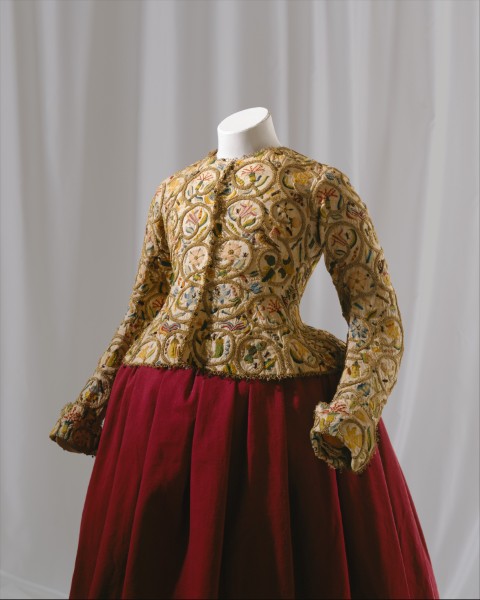
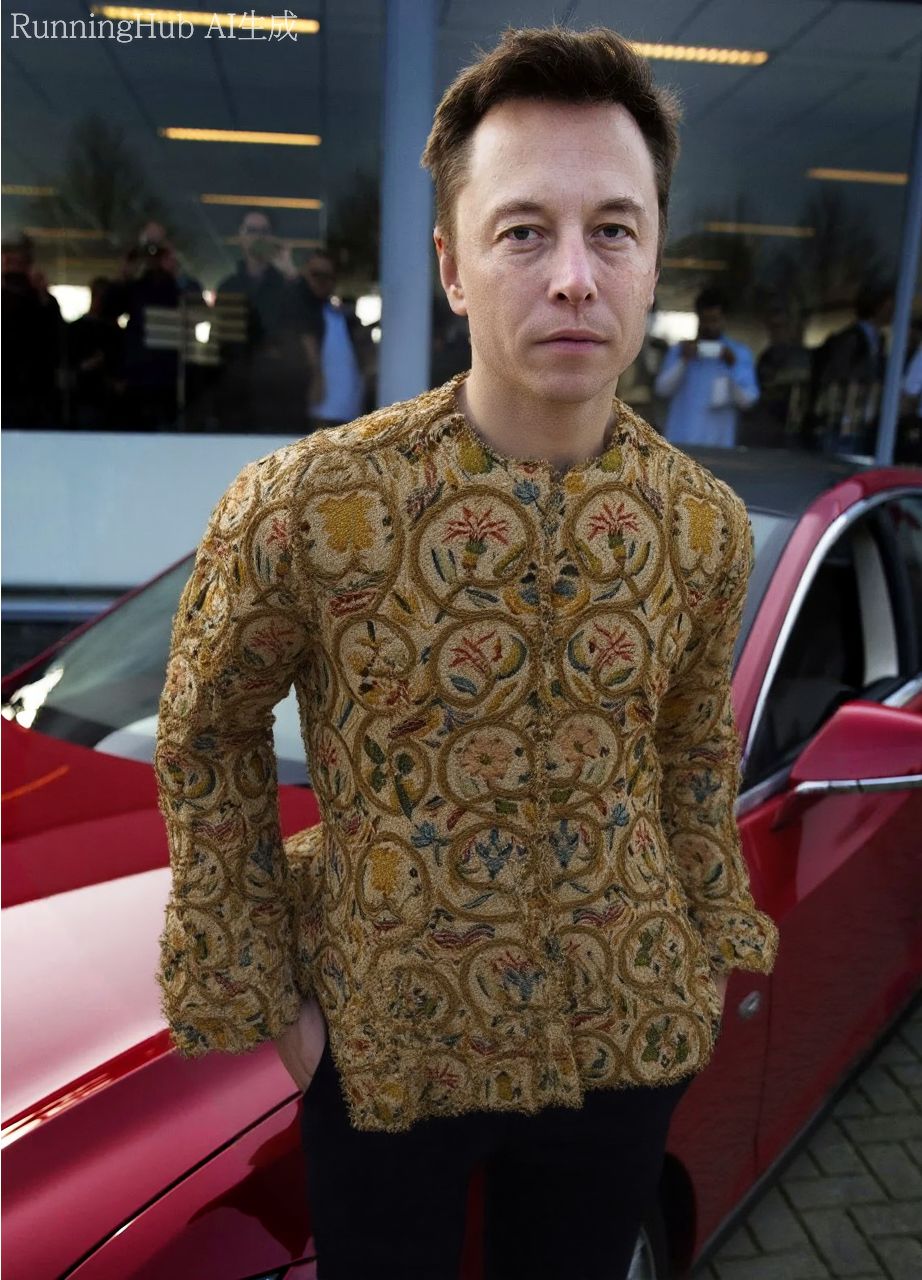
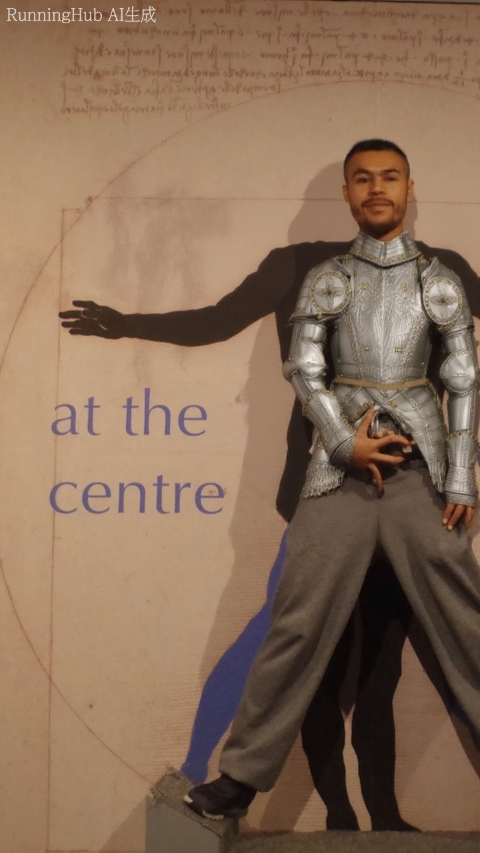
I used RunningHub to test the FLUX CAT VTON model.
| Input Person | Input Garment | Result |
|---|---|---|

|
|
|

|

|
|
Conclusion:
- WikiData has limited clothing data; sufficient for a game prototype but not for a full-fledged tool.
- FLUX CAT VTON takes 2–10 minutes to generate, and results can be inconsistent. It’s too slow for real-time API use.
Part 2: Pokémon Game with TriplyDB 🎮⚡
After experimenting with garments, I switched to TriplyDB to make a Pokémon game. The notebook is here.
Listing Pokémon from the Database
from SPARQLWrapper import SPARQLWrapper, JSON
import pandas as pd

ENDPOINT_URL = "https://api.triplydb.com/datasets/academy/pokemon/services/jena/sparql"
sparql = SPARQLWrapper(ENDPOINT_URL)

QUERY_TEMPLATE = """
PREFIX pokémon: <https://triplydb.com/academy/pokemon/id/pokemon/>
PREFIX vocab:   <https://triplydb.com/academy/pokemon/vocab/>
PREFIX rdfs:    <http://www.w3.org/2000/01/rdf-schema#>
PREFIX foaf:    <http://xmlns.com/foaf/0.1/>

SELECT ?pokemon ?name ?image ?typeLabel
WHERE {
  ?pokemon foaf:depiction ?image ;
           rdfs:label ?name ;
           vocab:type ?type .
  ?type rdfs:label ?typeLabel .
}
LIMIT 10
"""

query = QUERY_TEMPLATE
sparql.setQuery(query)
sparql.setReturnFormat(JSON)
results = sparql.query().convert()

rows = []
for result in results["results"]["bindings"]:
    image_url = result.get("image", {}).get("value", "")
    rows.append({
        "Pokemon": result["name"]["value"],
        "Image URL": f'<a href="{image_url}" target="_blank"><img src="{image_url}" width="80"/></a>' if image_url else "",
        "Type": result["typeLabel"]["value"]
    })

df = pd.DataFrame(rows)
df.style.set_properties(**{'text-align': 'left'}).hide(axis="index")
This generates a table with Pokémon names, images, and types.
| Pokemon | Image URL | Type |
|---|---|---|
| Silcoon |  |
Bug Type |
| Relicanth |  |
Rock Type |
| Relicanth | |
Water Type |
| Volbeat |  |
Bug Type |
| Palkia |  |
Water Type |
| Palkia | |
Dragon Type |
| Goldeen |  |
Water Type |
| Snorlax |  |
Normal Type |
| Cranidos |  |
Rock Type |
| Kangaskhan |  |
Normal Type |
Collecting Pokémon Types
QUERY_TYPES = """
PREFIX vocab: <https://triplydb.com/academy/pokemon/vocab/>
PREFIX rdfs:    <http://www.w3.org/2000/01/rdf-schema#>

SELECT DISTINCT ?typeLabel WHERE {
  ?pokemon vocab:type ?type .
  ?type rdfs:label ?typeLabel .
}
ORDER BY ?typeLabel
"""
sparql.setQuery(QUERY_TYPES)
sparql.setReturnFormat(JSON)
results = sparql.query().convert()

types = [result["typeLabel"]["value"] for result in results["results"]["bindings"]]
print(types)
Types found:
['Bug Type', 'Dark Type', 'Dragon Type', 'Electric Type', 'Fighting Type', 'Fire Type', 'Flying Type', 'Ghost Type', 'Grass Type', 'Ground Type', 'Ice Type', 'Normal Type', 'Poison Type', 'Psychic Type', 'Rock Type', 'Steel Type', 'Water Type']
Searching Pokémon by Type 🐉
def search_pokemon_by_type(pokemon_type, limit=50):
    query = f"""
    PREFIX pokémon: <https://triplydb.com/academy/pokemon/id/pokemon/>
    PREFIX vocab:   <https://triplydb.com/academy/pokemon/vocab/>
    PREFIX rdfs:    <http://www.w3.org/2000/01/rdf-schema#>
    PREFIX foaf:    <http://xmlns.com/foaf/0.1/>

    SELECT ?pokemon ?name ?image ?typeLabel
    WHERE {{
      ?pokemon foaf:depiction ?image ;
               rdfs:label ?name ;
               vocab:type ?type .
      ?type rdfs:label ?typeLabel .
      FILTER(LCASE(?typeLabel) = "{pokemon_type.lower()}")
    }}
    LIMIT {limit}
    """
    sparql.setQuery(query)
    sparql.setReturnFormat(JSON)
    results = sparql.query().convert()

    data = []
    for result in results["results"]["bindings"]:
        image_url = result.get("image", {}).get("value", "")
        data.append({
            "name": result["name"]["value"],
            "image": f'<a href="{image_url}" target="_blank"><img src="{image_url}" width="80"/></a>' if image_url else "",
            "type": result["typeLabel"]["value"]
        })
    return pd.DataFrame(data)
Example: List 10 Dragon Type Pokémon
df = search_pokemon_by_type(types[2], 10)
df.style.set_properties(**{'text-align': 'left'}).hide(axis="index")| name | image | type |
|---|---|---|
| Palkia | |
Dragon Type |
| Dialga |  |
Dragon Type |
| Dragonair |  |
Dragon Type |
| Bagon |  |
Dragon Type |
| Dratini |  |
Dragon Type |
| Kingdra |  |
Dragon Type |
| Dragonite |  |
Dragon Type |
| Vibrava |  |
Dragon Type |
| Giratina |  |
Dragon Type |
| Altaria |  |
Dragon Type |
Conclusion:
- With these queries, a simple Pokémon game can be made quickly.
- TriplyDB provides structured data with images and types, making it ideal for game prototyping.