
J.Gong
2025-12-27
2.49min
Week 53: From 2D to 3D 🎥➡️🕶️
On Christmas Eve 🎄, I experimented with Apple’s new Sharp Model to generate 3D Gaussian Splatting (link). Almost at the same time, I saw news that XREAL S1 now supports automatic 2D-to-3D streaming, and Google’s Android XR announced similar capabilities.
All of this instantly took me back almost three years ago, when I first got my Quest 2. Back then, I desperately wanted more immersive content to enjoy in VR (link).
Fast forward to now—so many companies are offering free or low-cost 2D-to-3D conversion services. That’s a strong signal that this technology has finally matured 🎉. And more importantly: I can now experiment with it cheaply—or even for free 😎.
StereoCrafter 🧪
The first tool I tried was Tencent’s StereoCrafter. To be honest, I spent way too much time fighting with it 😅, and the results weren’t great. Part of the problem was my limited GPU VRAM.
There’s also a small bug in the script that needs patching. I found this helpful blog post that explains one fix. The root cause is that different Linux distributions place CUDA in different directories. The same post also shows how to run the model on Google Colab with a paid GPU.
For example, on Arch Linux, CUDA might live in:
/opt/cudaIf you’re using Arch Linux inside WSL, you’ll likely hit this error:
libcuda.so: cannot open shared object fileThat happens because libcuda in WSL isn’t part of the standard Arch packages. The fix is to manually create symlinks:
sudo ln -s /usr/lib/wsl/lib/libcuda.so /usr/lib/libcuda.so
sudo ln -s /usr/lib/wsl/lib/libcuda.so.1 /usr/lib/libcuda.so.1
sudo ldconfig
Unfortunately, due to hardware limitations, I still couldn’t successfully convert a full video. That said, I did learn something important 🧠: AI-based 2D-to-3D video conversion is usually a two-step process:
- Predict a depth map
- Combine the depth map with the original video to generate a left scene and a right scene
- Using inpainting model to mask the holes of the newly generated video then combine the two scenes into side by side 3D video.
Owl3D 🦉✨
Owl3D offers free 2D-to-3D conversion for videos up to 1 minute. For longer videos, you can subscribe monthly.
The results are honestly pretty good 👍. Sure, the free limit is short, but if you want something fast, clean, and with a beautiful UI, this is a great option. Sometimes convenience really is worth it 😌.
VisionDepth 3D 🚀 (The Winner!)
This one was a real success 🎯. VisionDepth3D (VD3D) is an open-source 2D-to-3D converter—and it works surprisingly well.
⚠️ Strong recommendation: Skip the prebuilt release binaries. Clone the GitHub repo and build it yourself. The release versions still contain some annoying bugs.
The installation guide on the website is detailed and clear. One important reminder:
If you have an NVIDIA GPU, make sure to install the CUDA-enabled version of PyTorch. It makes the conversion much faster and much quieter 🏎️💨.
Step 1: Depth Estimation
- Go to the
Depth Estimationtab - Pick any model to estimate the video’s depth
- Watch the progress as the model downloads in the background
- Choose your output directory
- Click
Process Video
You’ll end up with something like this:
| Frame | Depth |
|---|---|
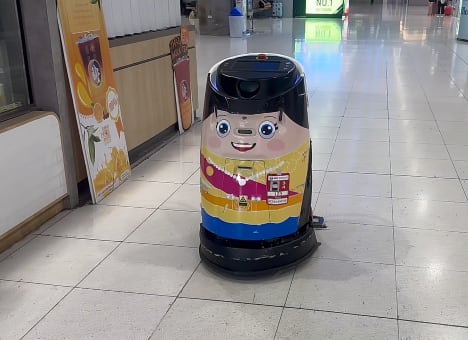 | 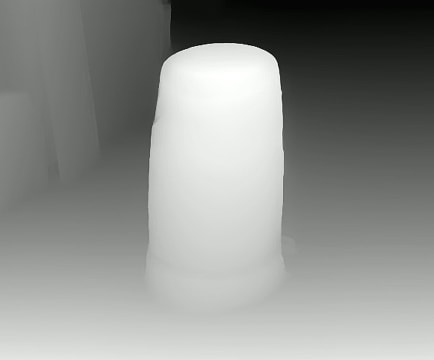 |
Step 2: Generate the 3D Video
-
Switch to the
3D Video Generatortab -
Click
Reset to Default -
Select:
- The original video
- The generated depth map
- The output directory
-
Change the encoder to a common, well-supported one
-
Change the DOF strength to zero
If the output video doesn’t play on Quest 3, you can re-encode it using ffmpeg:
ffmpeg -i input.mp4 -c:v libx265 -crf 20 -preset medium -c:a aac -b:a 192k output_HEVC.mp4Also you can use the GPU if you are using a Nvidia GPU.
ffmpeg -i input.mp4 -c:v hevc_nvenc -preset p5 -cq 20 -c:a aac -b:a 192k output_HEVC_NVENC.mp4Overall, it’s exciting to see how accessible 2D-to-3D conversion has become 🤩. What used to feel like sci-fi is now just a few clicks (and some GPU pain) away. Can’t wait to see where this goes next 🚀🕶️