
J.Gong
2026-02-24
1.11min
Horizon OS 2.0
During the month I was traveling ✈️, a lot of breakthroughs quietly happened. One of the biggest updates? Meta officially rolled out Horizon OS 2.0.
At first glance, you might not notice many “brand-new” features. Most of them were already teased in previous commercials and announcements. But actually being able to use them in daily life? That’s a completely different feeling. And honestly… it’s pretty exciting. 👀
📸 Instagram in 3D
Yes — Instagram is now in 3D.
It seems like Quest is using a local AI model to render 2D images into SBS (Side-by-Side) 3D in real time. I previously wrote a post about converting normal video into SBS 3D, so seeing this built directly into the system feels like the future arriving early.
When you scroll through the feed, it almost feels like riding one of those old-school Paternoster lifts in Prague — endless vertical motion, little content “boxes” moving up and down around you. 🏢⬆️⬇️
It’s immersive… but I have to admit — it made me slightly dizzy. 😵💫
I’m still wondering how Apple solves this kind of spatial UI comfort problem.
⌨️ The Virtual Keyboard (My Favorite Feature)
This is the one I love the most.
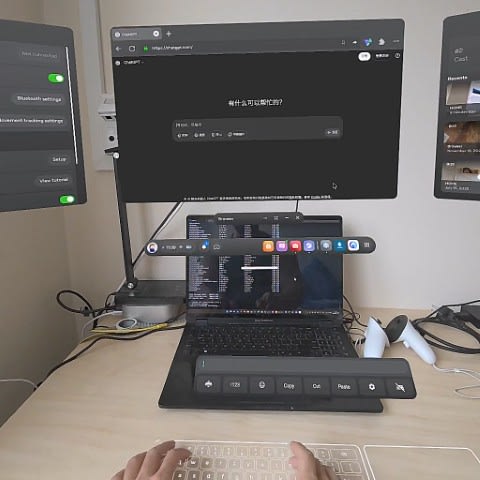
You can now project a virtual keyboard and trackpad onto any flat surface — desk, table, whatever is in front of you.
And surprisingly? It’s extremely accurate. 🤯
Typing feels natural, tracking is stable, and it genuinely makes productivity inside XR much more practical. This might be one of those features that quietly changes daily usage habits.
🧭 The New Navigator (Well… Kind Of)
There’s also a redesigned system navigator.
Unfortunately, I can’t test it.
Last year I manually disabled the navigator testing toggle. With this new OS update, that toggle is gone — and now I’m stuck with the old navigator. 😅
But honestly? I’m not a huge fan of the new one anyway. So maybe it’s fine.